Imagine managing thousands of users, apps, and devices across the globe with just a few clicks. That’s the power of Azure Active Directory—a cloud-based identity and access management service that’s redefining how organizations secure their digital ecosystems.





What Is Azure Active Directory and Why It Matters

Azure Active Directory (Azure AD) is Microsoft’s cloud-based identity and access management (IAM) solution, designed to help organizations securely manage user identities and control access to applications and resources. Unlike traditional on-premises directory services like Windows Server Active Directory, Azure AD operates in the cloud, offering scalability, flexibility, and seamless integration with Microsoft 365, Azure, and thousands of third-party applications.
Core Purpose of Azure Active Directory
The primary goal of Azure Active Directory is to provide secure authentication and authorization for users accessing cloud and on-premises resources. It ensures that only the right people have access to the right resources at the right time, reducing the risk of data breaches and unauthorized access.
- Centralized identity management across cloud and hybrid environments
- Single Sign-On (SSO) for thousands of SaaS applications
- Multi-factor authentication (MFA) to enhance security
According to Microsoft, over 95% of Fortune 500 companies use Azure AD to manage identities and secure access to enterprise resources.
Differences Between Azure AD and On-Premises AD
While both Azure Active Directory and traditional Active Directory manage user identities, they serve different purposes and architectures. On-premises AD is built for Windows domain networks and relies on domain controllers, Group Policy, and LDAP protocols.
- Azure AD is cloud-native, while on-premises AD is server-based
- Azure AD uses REST APIs and OAuth/OpenID Connect, whereas on-prem AD uses LDAP and Kerberos
- Azure AD supports modern authentication methods like MFA and Conditional Access
“Azure Active Directory is not just a cloud version of Active Directory—it’s a fundamentally different service designed for the cloud era.” — Microsoft Docs
Key Features of Azure Active Directory
Azure Active Directory offers a robust set of features that empower organizations to manage identities, enforce security policies, and streamline user access. These features are essential for modern enterprises embracing digital transformation and hybrid work models.
Single Sign-On (SSO)
Single Sign-On is one of the most widely used features in Azure Active Directory. It allows users to log in once and gain access to multiple applications without re-entering credentials. This improves user experience and reduces password fatigue.
- Supports over 2,600 pre-integrated SaaS apps like Salesforce, Dropbox, and Slack
- Enables seamless access to both cloud and on-premises applications via Azure AD Application Proxy
- Reduces helpdesk tickets related to password resets by up to 40%
Learn more about SSO capabilities on the official Microsoft Azure AD SSO documentation.
Multi-Factor Authentication (MFA)
Multi-Factor Authentication adds an extra layer of security by requiring users to verify their identity using at least two methods—something they know (password), something they have (phone or token), or something they are (biometrics).
- Available in Azure AD Free, but with limited usage policies
- Can be enforced based on user risk, location, or device compliance
- Supports app-based notifications, phone calls, SMS, and hardware tokens
Organizations using MFA report a 99.9% reduction in account compromise incidents, according to Microsoft’s security research.
Conditional Access
Conditional Access is a powerful feature in Azure Active Directory that allows administrators to enforce access controls based on specific conditions such as user location, device compliance, sign-in risk, and application sensitivity.
- Enables zero-trust security models by evaluating each access request dynamically
- Can block access from untrusted locations or require MFA for high-risk apps
- Integrates with Microsoft Defender for Cloud Apps and Intune for device compliance
For example, a Conditional Access policy can require MFA when a user logs in from a new country or block access if the device isn’t compliant with corporate security policies.
Understanding Azure AD Authentication Methods
Authentication is the foundation of Azure Active Directory. It verifies user identities before granting access to resources. Azure AD supports a variety of modern authentication protocols and methods that go beyond traditional username and password.
Passwordless Authentication
Passwordless authentication eliminates the need for passwords by using more secure methods like FIDO2 security keys, Windows Hello for Business, or the Microsoft Authenticator app.
- Users sign in using biometrics (fingerprint, facial recognition) or a physical security key
- Reduces phishing risks since there’s no password to steal
- Supported across Windows, iOS, and Android devices
Microsoft reports that organizations adopting passwordless authentication see a 50% reduction in identity-related helpdesk costs.
OAuth 2.0 and OpenID Connect
Azure Active Directory uses industry-standard protocols like OAuth 2.0 and OpenID Connect to enable secure authorization and authentication for web and mobile applications.
- OAuth 2.0 allows apps to request limited access to user accounts without exposing credentials
- OpenID Connect is built on top of OAuth 2.0 and provides identity layer for user authentication
- Developers can integrate Azure AD into custom apps using Microsoft Identity Platform
These protocols are essential for building secure, scalable applications in modern cloud environments. Developers can find detailed implementation guides on Microsoft’s Identity Platform documentation.
Hybrid Authentication Options
For organizations with existing on-premises infrastructure, Azure AD supports hybrid authentication models that bridge the gap between legacy systems and cloud services.
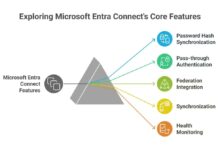
- Password Hash Sync (PHS): Syncs on-premises password hashes to Azure AD for cloud authentication
- Pass-through Authentication (PTA): Validates user credentials against on-premises AD without storing passwords in the cloud
- Federation with AD FS: Uses existing AD FS infrastructure for single sign-on to cloud apps
Each method has its pros and cons. PTA is often preferred for its simplicity and real-time validation, while federation offers more control over authentication policies.
Roles and Administration in Azure Active Directory
Effective administration of Azure Active Directory requires a clear understanding of role-based access control (RBAC). Azure AD provides built-in roles that help organizations delegate responsibilities securely and follow the principle of least privilege.
Built-in Administrator Roles
Azure AD includes several pre-defined administrator roles, each with specific permissions. These roles range from global administrators to specialized roles like password administrators and user administrators.
- Global Administrator: Full access to all Azure AD features and resources
- Application Administrator: Can manage app registrations and consent
- Security Administrator: Can manage security policies, MFA, and Conditional Access
- Helpdesk Administrator: Can reset passwords for non-admin users
It’s crucial to assign these roles carefully. Microsoft recommends avoiding permanent Global Administrator assignments and using Privileged Identity Management (PIM) for just-in-time access.
Custom Roles and Role-Based Access Control
In addition to built-in roles, Azure AD allows organizations to create custom roles with granular permissions tailored to specific job functions.
- Custom roles can be defined using Azure AD role templates and permission sets
- Helps enforce least privilege by granting only necessary permissions
- Available in Azure AD Premium P2 license tier
For example, a company might create a “Cloud App Support” role that allows resetting passwords and managing app assignments but cannot modify security policies.
Privileged Identity Management (PIM)
Privileged Identity Management is a critical component of Azure Active Directory that enables just-in-time and time-bound access to privileged roles.
- Administrators must request activation of privileged roles when needed
- Access can be limited to a specific duration (e.g., 4 hours)
- Requires multi-factor authentication and approval workflows for activation
PIM significantly reduces the attack surface by ensuring that privileged accounts are not permanently active. It’s a cornerstone of zero-trust security strategies.
Security and Compliance in Azure Active Directory
Security is at the heart of Azure Active Directory. With cyber threats evolving rapidly, Azure AD provides advanced tools to detect, prevent, and respond to identity-based attacks.
Identity Protection and Risk Detection
Azure AD Identity Protection uses machine learning and risk signals to detect suspicious sign-in activities and compromised user accounts.
- Identifies risks such as sign-ins from anonymous IPs, unfamiliar locations, or leaked credentials
- Assigns risk levels (low, medium, high) to each sign-in attempt
- Can automatically enforce remediation actions like requiring password reset or blocking access
For instance, if a user logs in from Nigeria and then from Canada within minutes, Identity Protection flags it as an impossible travel scenario and triggers a risk-based policy.
Conditional Access for Threat Mitigation
Conditional Access policies can be integrated with Identity Protection to automatically respond to risky sign-ins.
- Block access or require MFA when high-risk sign-ins are detected
- Combine with device compliance policies to ensure only trusted devices access corporate data
- Supports real-time enforcement and automated remediation
This integration allows organizations to move from reactive to proactive security, minimizing the window of exposure during an attack.
Audit Logs and Monitoring
Azure Active Directory provides comprehensive audit logs that track user activities, sign-ins, and administrative changes.
- Logs include details like IP address, device, location, and application accessed
- Data is retained for up to 30 days in free tier, 90 days in premium tiers
- Can be exported to Azure Monitor, Log Analytics, or SIEM tools like Splunk
Regular review of audit logs helps detect anomalies, investigate security incidents, and meet compliance requirements like GDPR, HIPAA, or ISO 27001.
Integration and Extensibility of Azure Active Directory
Azure Active Directory is not just an identity provider—it’s a platform that integrates with a wide range of services and tools to extend its capabilities across the enterprise IT landscape.
Integration with Microsoft 365 and Azure
Azure AD is the backbone of Microsoft 365 and Azure, providing identity management for services like Exchange Online, SharePoint, Teams, and Azure Virtual Machines.
- Every Microsoft 365 user is an Azure AD user
- Azure resources use Azure AD for role assignments and access control
- Enables seamless SSO and conditional access across Microsoft cloud services
This deep integration ensures a consistent security posture across all Microsoft cloud offerings.
Third-Party Application Integration
Azure AD supports integration with thousands of third-party SaaS applications through the Azure AD app gallery.
- Pre-built connectors for apps like Zoom, Workday, ServiceNow, and Adobe
- Supports SAML, OAuth, and OpenID Connect protocols
- Enables centralized provisioning and de-provisioning of user accounts
For example, when an employee leaves the company, administrators can disable their Azure AD account, which automatically revokes access to all connected SaaS apps.
Custom App Development with Microsoft Identity Platform
Developers can build custom applications that integrate with Azure Active Directory using the Microsoft Identity Platform (formerly Azure AD v2.0 endpoint).
- Supports modern authentication for web, mobile, and desktop apps
- Provides SDKs for .NET, JavaScript, Python, and other languages
- Enables secure access to Microsoft Graph API for user data and resources
More information is available on Microsoft’s developer portal.
Best Practices for Managing Azure Active Directory
To get the most out of Azure Active Directory, organizations should follow industry best practices that enhance security, improve user experience, and ensure operational efficiency.
Enable Multi-Factor Authentication for All Users
MFA is one of the most effective ways to prevent unauthorized access. Organizations should enforce MFA for all users, especially administrators.
- Use the Microsoft Authenticator app for a seamless user experience
- Consider passwordless options like FIDO2 keys for high-security roles
- Monitor MFA registration rates and encourage adoption through training
Microsoft recommends enabling MFA as the first step in securing Azure AD environments.
Implement Conditional Access Policies
Conditional Access should be used to enforce security policies based on context, not just static rules.
- Start with policies that require MFA for administrative roles
- Gradually expand to high-risk applications and external networks
- Use sign-in risk detection to trigger adaptive controls
A well-designed Conditional Access strategy supports zero-trust principles and reduces the risk of data breaches.
Regularly Review and Clean Up User Accounts
Orphaned or inactive user accounts pose a significant security risk. Regular account reviews help maintain a clean identity environment.
- Use Azure AD Access Reviews to automate user access certification
- Set up lifecycle workflows to de-provision users when they leave the organization
- Monitor guest user access and remove unnecessary external collaborators
Automating these processes reduces administrative overhead and improves compliance.
What is Azure Active Directory used for?
Azure Active Directory is used for managing user identities, enabling single sign-on to applications, enforcing security policies like multi-factor authentication and Conditional Access, and integrating with Microsoft 365, Azure, and thousands of third-party apps.
Is Azure Active Directory free?
Azure Active Directory has a free tier with basic features like user management and SSO. Advanced features like Conditional Access, Identity Protection, and Privileged Identity Management require Azure AD Premium P1 or P2 licenses.
How does Azure AD differ from Windows Active Directory?
Windows Active Directory is an on-premises directory service for managing Windows domains, while Azure AD is a cloud-based identity and access management service designed for modern applications and hybrid environments. They use different protocols and are not direct replacements.
Can Azure AD replace on-premises Active Directory?
Azure AD can complement or partially replace on-premises AD in hybrid environments, but it doesn’t fully replace it for legacy applications that rely on domain controllers, Group Policy, or LDAP. Many organizations use both together.
How do I secure Azure Active Directory?
To secure Azure AD, enable multi-factor authentication, implement Conditional Access policies, use Privileged Identity Management for admin roles, monitor sign-in logs, and regularly review user access. Following zero-trust principles is recommended.
Mastering Azure Active Directory is no longer optional—it’s essential for any organization operating in the cloud. From securing user identities to enabling seamless access across thousands of applications, Azure AD provides the tools needed to build a resilient, modern IT infrastructure. By leveraging its powerful features like Conditional Access, Identity Protection, and passwordless authentication, businesses can stay ahead of evolving cyber threats while empowering their workforce. The key is to start with foundational security practices, integrate Azure AD across your ecosystem, and continuously optimize your identity strategy.
Recommended for you 👇
Further Reading: